Claude Lessons / Guides
Claude Code Hooks: 12 Copy-Paste Examples That Enforce Your Rules (2026)
Anything you write in CLAUDE.md is a suggestion — Claude usually follows it. A hook is a rule: it runs every single time, whether the model remembers or not. This guide gives you 12 working hook configurations to copy, and — just as important — explains the mechanics and footguns, so you can write your own without an infinite Stop loop eating your afternoon.
What hooks are (and when to use them over CLAUDE.md)
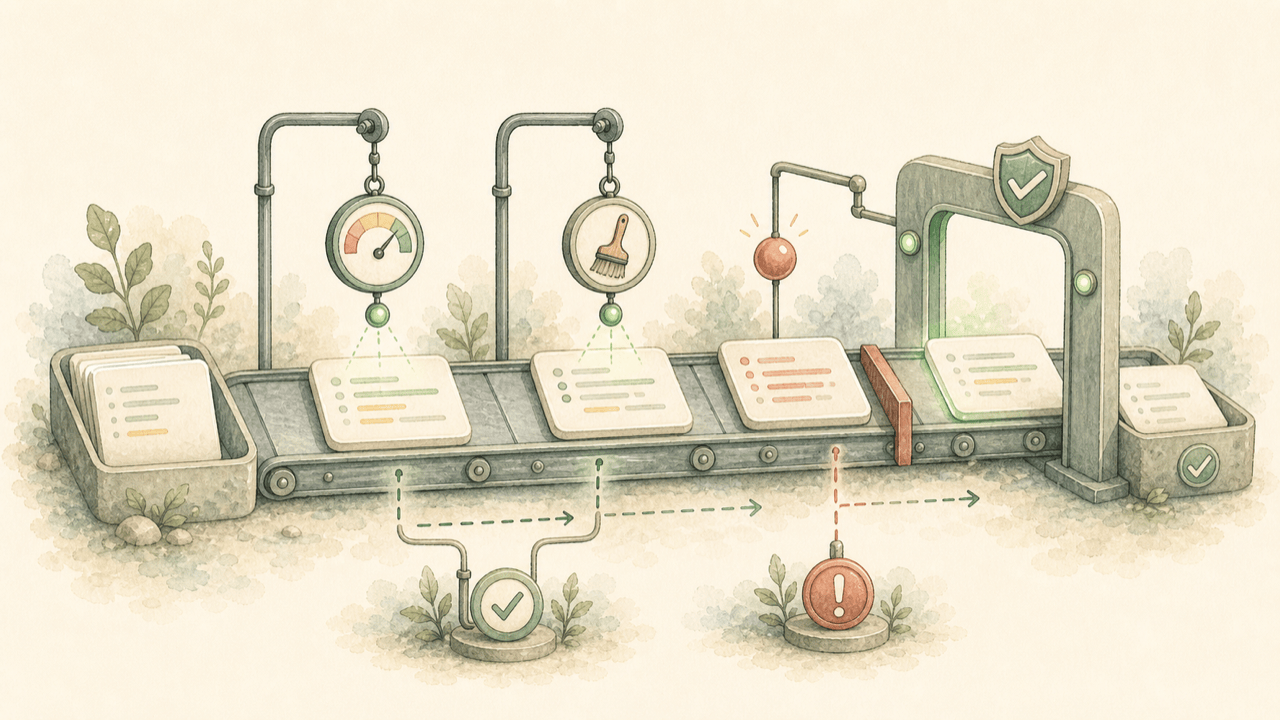
Hooks are commands that Claude Code executes automatically at fixed points in its lifecycle: before and after tool calls, at session start, when Claude tries to finish, and more. Think git hooks, but for every action an AI agent takes in your project.
The decision rule that keeps your setup sane:
- Preference? CLAUDE.md. ("Prefer named exports.")
- Requirement? Hook. ("Every edited file gets formatted." "Never touch .env.")
- External service? MCP server. ("Read our Jira board.")
If breaking the rule would be a real problem, don't ask a probabilistic model to remember it — enforce it deterministically. If you're still getting comfortable with Claude Code basics first, start with our beginner's tutorial and come back once the core loop feels natural.
Your first hook in 2 minutes
Hooks live in JSON settings files. Three locations, three scopes:
| File | Scope |
|---|---|
~/.claude/settings.json | You, in every project |
.claude/settings.json | This project — commit it, share with the team |
.claude/settings.local.json | This project, just you (gitignored) |
Add this to .claude/settings.json to auto-format every file Claude writes or edits:
{
  "hooks": {
    "PostToolUse": [
      {
        "matcher": "Write|Edit",
        "hooks": [
          {
            "type": "command",
            "command": "jq -r '.tool_input.file_path' | xargs npx prettier --write 2>/dev/null; exit 0"
          }
        ]
      }
    ]
  }
}
That's the whole pattern: an event (PostToolUse), a matcher (which
tools trigger it), and a command that receives event details as JSON on stdin. The
trailing exit 0 means "never block, even if Prettier chokes on a file type it doesn't
know." Run /hooks inside Claude Code to confirm it's registered, then ask Claude to create
any file and watch the formatting apply.
How hooks work: stdin, exit codes, JSON output
Every hook receives a JSON payload on stdin describing the event. For a PreToolUse on Bash:
{
  "session_id": "abc123",
  "cwd": "/your/project",
  "hook_event_name": "PreToolUse",
  "tool_name": "Bash",
  "tool_input": { "command": "rm -rf node_modules" }
}
Your hook talks back through its exit code:
| Exit code | Meaning |
|---|---|
0 | Proceed. Stdout can add context for Claude. |
2 | Block the action. Stderr is shown to Claude as feedback, so write a useful message. |
| anything else | Non-blocking error; the action proceeds. |
For finer control, print JSON to stdout instead. A PreToolUse hook can auto-approve, deny, or defer to the normal permission prompt:
{
  "hookSpecificOutput": {
    "hookEventName": "PreToolUse",
    "permissionDecision": "deny",
    "permissionDecisionReason": "Blocked by project policy"
  }
}
Two environment details worth knowing: $CLAUDE_PROJECT_DIR points at your project root (use
it so hooks work no matter where Claude runs a command from), and hook entries accept
"timeout" and "async": true for slow jobs that shouldn't block the session.
Every hook event, in one table
| Event | Fires | Can block? | Matcher values |
|---|---|---|---|
SessionStart | Session begins or resumes | No | startup, resume, compact, clear |
UserPromptSubmit | You submit a prompt | Yes | — |
PreToolUse | Before a tool runs | Yes | Tool names: Bash, Edit, Write, Read, mcp__*… |
PermissionRequest | Permission dialog appears | Yes | Same as PreToolUse |
PostToolUse | After a tool succeeds | No | Same as PreToolUse |
PostToolUseFailure | After a tool fails | No | Same as PreToolUse |
Notification | Claude needs input / goes idle | No | permission_prompt, idle_prompt |
Stop | Main agent tries to finish | Yes | — |
SubagentStart / SubagentStop | Subagent spawns / finishes | Stop only | Agent type |
PreCompact | Before context compaction | No | manual, auto |
SessionEnd | Session terminates | No | clear, logout, other |
Matchers are case-sensitive. bash matches nothing; tool names are
PascalCase (Bash, Edit, Write). Matchers accept regex —
Write|Edit, mcp__github__.* — and an empty matcher applies to every tool on
that event.
The 12 examples
1. Auto-format every edited file
The starter hook from above. Swap prettier for black, gofmt, or rustfmt to taste. PostToolUse can't block — it reacts, which is exactly right for formatting.
2. Block destructive commands
Save as .claude/hooks/block-danger.sh and chmod +x it:
#!/bin/bash
CMD=$(jq -r '.tool_input.command // empty')
for p in "rm -rf /" "rm -rf ~" "DROP TABLE" "TRUNCATE" "git push --force" "git push -f"; do
  if echo "$CMD" | grep -qiF -- "$p"; then
    echo "Blocked: \"$p\" is not allowed by project policy" 1>&2
    exit 2
  fi
done
exit 0
{
"hooks": {
"PreToolUse": [
{
"matcher": "Bash",
"hooks": [
{ "type": "command", "command": "\"$CLAUDE_PROJECT_DIR\"/.claude/hooks/block-danger.sh" }
]
}
]
}
}Exit code 2 blocks the command and feeds your stderr message back to Claude, which then works around the restriction instead of retrying it blindly.
3. Protect sensitive files from writes
Same shape, different target — save as .claude/hooks/protect-files.sh, wire it to PreToolUse with matcher Write|Edit:
#!/bin/bash
FILE=$(jq -r '.tool_input.file_path // empty')
for pattern in ".env" "secrets/" ".git/" "package-lock.json" "pnpm-lock.yaml"; do
  case "$FILE" in
    *"$pattern"*)
      echo "Protected path: $pattern — edit this manually if it's really needed" 1>&2
      exit 2
      ;;
  esac
done
exit 0
4. Desktop notification when Claude needs you
Stop watching the terminal. macOS:
{
  "hooks": {
    "Notification": [
      {
        "matcher": "permission_prompt|idle_prompt",
        "hooks": [
          {
            "type": "command",
            "command": "osascript -e 'display notification \"Claude Code needs your input\" with title \"Claude Code\" sound name \"Ping\"'"
          }
        ]
      }
    ]
  }
}
Linux: replace the command with notify-send 'Claude Code' 'Needs your attention'.
5. Audit-log every shell command
{
  "hooks": {
    "PostToolUse": [
      {
        "matcher": "Bash",
        "hooks": [
          {
            "type": "command",
            "command": "jq -r '\"\\(now | todate) \\(.tool_input.command)\"' >> \"$CLAUDE_PROJECT_DIR\"/.claude/command-audit.log; exit 0"
          }
        ]
      }
    ]
  }
}
Cheap, invisible, and the first thing you'll be glad exists when you're reconstructing what happened in an auto-accept session.
6. Typecheck after TypeScript edits
{
  "hooks": {
    "PostToolUse": [
      {
        "matcher": "Write|Edit",
        "hooks": [
          {
            "type": "command",
            "command": "FILE=$(jq -r '.tool_input.file_path'); case \"$FILE\" in *.ts|*.tsx) npx tsc --noEmit 2>&1 | head -20 ;; esac; exit 0",
            "timeout": 30
          }
        ]
      }
    ]
  }
}
The output lands in Claude's context, so type errors get fixed in the same breath as the edit that caused them.
7. Don't let Claude finish while tests fail
The Stop event is the enforcement gate: exit 2 and Claude keeps working. Save as .claude/hooks/verify-tests.sh:
#!/bin/bash
INPUT=$(cat)
# CRITICAL: without this guard you create an infinite loop.
if [ "$(echo "$INPUT" | jq -r '.stop_hook_active')" = "true" ]; then
  exit 0
fi
if ! npm test --silent; then
  echo "Tests are failing. Fix them before finishing." 1>&2
  exit 2
fi
exit 0
{
"hooks": {
"Stop": [
{
"hooks": [
{ "type": "command", "command": "\"$CLAUDE_PROJECT_DIR\"/.claude/hooks/verify-tests.sh", "timeout": 120 }
]
}
]
}
}
The #1 hooks footgun: a Stop hook that blocks unconditionally blocks forever —
Claude finishes, your hook says no, Claude works, tries to finish, your hook says no… Always check
stop_hook_active and stand down on the second pass.
8. Re-inject project context after compaction
Long sessions compact their history, and details get fuzzy right after. This hook re-briefs Claude the moment it happens:
{
  "hooks": {
    "SessionStart": [
      {
        "matcher": "compact",
        "hooks": [
          {
            "type": "command",
            "command": "echo 'Reminders: use pnpm (not npm). Run pnpm test before commits. Never edit src/generated/.'"
          }
        ]
      }
    ]
  }
}
9. Load git context on startup and resume
{
  "hooks": {
    "SessionStart": [
      {
        "matcher": "startup|resume",
        "hooks": [
          {
            "type": "command",
            "command": "echo \"Branch: $(git -C \"$CLAUDE_PROJECT_DIR\" branch --show-current). Recent: $(git -C \"$CLAUDE_PROJECT_DIR\" log --oneline -3 | tr '\\n' ' ')\""
          }
        ]
      }
    ]
  }
}
Claude starts every session already knowing where it is.
10. Auto-approve read-only operations
Reads can't break anything — skip the permission prompts for them and save your attention for writes:
{
  "hooks": {
    "PreToolUse": [
      {
        "matcher": "Read|Glob|Grep",
        "hooks": [
          {
            "type": "command",
            "command": "echo '{\"hookSpecificOutput\":{\"hookEventName\":\"PreToolUse\",\"permissionDecision\":\"allow\"}}'"
          }
        ]
      }
    ]
  }
}
11. Watch MCP tools like any other tool
MCP tools match with mcp__servername__toolname patterns, so you can log or gate a specific integration:
{
  "hooks": {
    "PostToolUse": [
      {
        "matcher": "mcp__.*",
        "hooks": [
          {
            "type": "command",
            "command": "jq -r '\"\\(now | todate) \\(.tool_name)\"' >> \"$CLAUDE_PROJECT_DIR\"/.claude/mcp-audit.log; exit 0"
          }
        ]
      }
    ]
  }
}
12. A prompt hook for judgment calls
When "done" can't be reduced to a regex, hooks can ask a model. A type: "prompt" hook on
Stop reviews whether the request was actually completed:
{
  "hooks": {
    "Stop": [
      {
        "hooks": [
          {
            "type": "prompt",
            "prompt": "Review the conversation. Was the user's request fully completed — files created, tests passing, no TODOs left? Respond {\"ok\": true} or {\"ok\": false, \"reason\": \"what remains\"}.",
            "timeout": 30
          }
        ]
      }
    ]
  }
}
If the answer is ok: false, Claude keeps working on the stated reason. There's also
type: "agent" for multi-step verification — a subagent that can read files and run
commands before rendering a verdict. Use command hooks for the deterministic 90%, and save
prompt/agent hooks for gates that genuinely need judgment: they cost model time on every trigger.
Hooks are one lesson of 38
"Use hooks for non-negotiable checks" is a hands-on lesson in Claude Lessons — alongside plan mode, permissions, verification, subagents, and MCP. Practice the whole workflow in a simulated Claude Code workspace, free in your browser.
Practice this hands-on in the free interactive lessonsCommand vs prompt vs agent hooks, in one line each
- Command — shell script; deterministic; use for formatting, blocking, logging. Milliseconds.
- Prompt — one model call, yes/no answer; use for semantic gates ("does this match the request?").
- Agent — a subagent with tools; use for multi-step verification (run suite, check types, grep for debug code).
Troubleshooting
- Hook isn't firing. Run
/hooksto see what's actually loaded. Check the matcher case (Bash, notbash), the event (PostToolUse only fires on success; failures are PostToolUseFailure), and that scripts are executable (chmod +x). - Test scripts directly. Don't debug through Claude — pipe sample JSON in yourself:
Expect exit 2 for a block.echo '{"tool_name":"Bash","tool_input":{"command":"git push --force"}}' | .claude/hooks/block-danger.sh; echo "exit: $?" - Watch hooks live. Start with
claude --debug, or toggle verbose output with Ctrl+O during a session. - Infinite Stop loop. You forgot the
stop_hook_activeguard (example 7). - "jq: command not found."
brew install jq/apt-get install jq, or parse withpython3 -c "import sys,json; print(json.load(sys.stdin)['tool_input']['file_path'])". - Corrupted JSON errors. A chatty shell profile (echo in
.zshrc) can pollute hook output — wrap greeting output in an interactive-shell check.
FAQ
What are Claude Code hooks?
Hooks are user-defined commands that run automatically at specific points in Claude Code's lifecycle — before a tool runs, after a file edit, when a session starts, when Claude tries to finish, and so on. They give you deterministic control: unlike an instruction in CLAUDE.md, which Claude usually follows, a hook always runs.
Where do I configure Claude Code hooks?
In JSON settings files: ~/.claude/settings.json (all your projects),
.claude/settings.json (this project, committed to git and shared with the team), or
.claude/settings.local.json (this project, gitignored). Run the /hooks command
inside Claude Code to view and manage active hooks.
Can hooks block dangerous commands?
Yes. A PreToolUse hook can block any tool call by exiting with code 2 (stderr becomes feedback to
Claude) or by printing a JSON permissionDecision of deny. Teams use this to
stop force pushes, rm -rf, writes to .env files, and edits to protected directories.
What's the difference between command, prompt, and agent hooks?
Command hooks run shell commands — best for deterministic checks like formatting, blocking patterns, or logging. Prompt hooks ask a Claude model a yes/no question for judgment calls a regex can't make. Agent hooks spawn a subagent that can read files and run commands for multi-step verification.
Do hooks slow Claude Code down?
Command hooks add milliseconds. Prompt and agent hooks call a model, so they're slower — give them timeouts and reserve them for high-value gates like end-of-task verification. Long-running hooks that don't need to block can run async.
Why isn't my hook firing?
The usual causes: the settings file wasn't loaded (check with /hooks), the matcher is wrong
(tool matchers are case-sensitive PascalCase — Bash, not bash), the script
isn't executable (chmod +x), or you're on the wrong event (PostToolUse only fires on
success). Test scripts directly by piping sample JSON into them, and run claude --debug to
watch hooks execute.